
Beyond Ticketing: The Ultimate Guide to a Unified Support Inbox for Email and Slack
Move beyond tickets. Learn how a unified support inbox for Slack and email helps teams keep context, collaborate faster, and support customers without chaos.


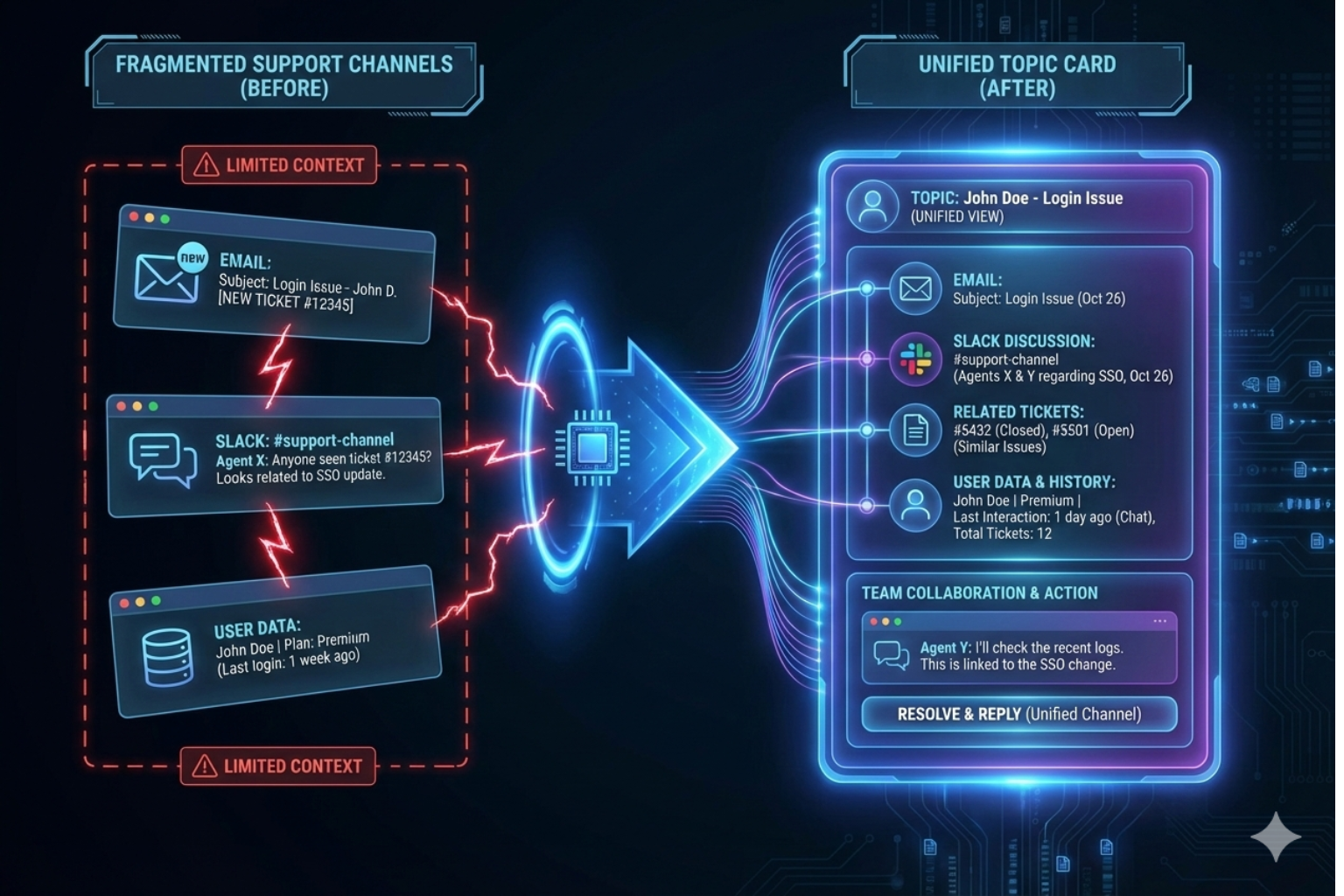
You know the feeling all too well.
Your browser has thirty tabs open, and your wrist is sore from hitting Alt-Tab for the thousandth time today.
On one screen, a high-value client is pinging you in Slack Connect, asking for an urgent update on a bug.
On the other screen, an automated Zendesk notification tells you that the same client just sent an angry email about the same issue.
You realize your team is replying in both places, giving two different answers, and losing their minds in the process. Does it feel like you are fighting the tools instead of helping the customers?
Are you tired of critical context falling through the cracks of your fragmented communication stack? This is where the magic of a unified support inbox for slack and email changes everything for modern B2B teams.
In this guide, we will explore why traditional ticketing is failing and how a unified approach restores sanity to your support workflow.
The Chaos of the "Two-Front" Support War
Modern B2B support is no longer a linear process where a ticket arrives, gets solved, and disappears. We live in the era of instant access, where customers expect you to be everywhere they are.
They want the formal trail of an email thread for documentation. Yet, they also want the real-time intimacy of a Slack channel for quick questions.
When you split your attention between these two worlds, your efficiency takes a massive hit.
The Hidden Cost of Context Switching
Every time you switch from Slack to your email client, your brain pays a "switching cost." Research suggests it can take up to 23 minutes to refocus after a distraction.
Can you afford that kind of lag when a Tier 1 priority issue is on the line? A unified support inbox for slack and email eliminates this cognitive load entirely. It allows you to view the entire history of a customer relationship in one single stream of consciousness.
No more searching for "that one PDF" the client sent over email while you are chatting with them on Slack.
The Cognitive Drain on Professional Teams
Your brain isn't a computer with infinite RAM. It requires significant energy to load the context of a new task.
When you bounce from high-level strategy to a mundane scheduling chat, you experience attention residue. Part of your mind stays stuck on the previous task, leaving you less sharp for the current, critical decision.
This cognitive drag is amplified in industries like financial services or B2B SaaS, where precision is a requirement. When your focus is fractured, you are more likely to miss subtle nuances in a client's risk profile or a technical update.
How much higher could your billable value be if you operated in a "flow state" for four hours every day?
Why Traditional Help Desks Fail Slack-First Teams
Traditional help desks were built in the 1990s and early 2000s when email was king. They treat every interaction as a "ticket number" to be processed and closed.
But Slack Connect isn't about tickets; it is about relationships.
When you try to force a Slack conversation into a legacy ticketing system, the experience feels broken.
• Formatting breaks: Code snippets and emojis from Slack look like gibberish in old email tools.
• Speed mismatch: Slack is fast; ticketing systems are notoriously slow and clunky.
• Visibility gaps: Your engineers are in Slack, but your support team is in the help desk, creating a wall between them.
Have you ever had to copy-paste a Slack message into a ticket just so your manager could see it? That is manual labor that a computer should be doing for you.
A unified approach ensures that your Slack customer support strategy doesn't feel like an afterthought.
Deemerge: The Intelligent Middle Ground
At Deemerge, we realized that support teams don't need another complex database. You need an intelligent bridge that understands the nuances of both platforms.
Think of Deemerge as the command center for your customer conversations. We don't just "import" messages; we synthesize them into a coherent narrative.
By positioning ourselves as the middle ground, we offer more context than a traditional help desk without the noise of a raw Slack feed. You get the structure of a ticket with the speed of a chat.
Does your current tool allow you to see an email draft while discussing it with your team in a private Slack thread? If not, you are working harder than you need to.
Key Benefits of a Unified Support Inbox for Slack and Email
If you are still on the fence about consolidating your tools, consider these operational advantages.
1. A Single Source of Truth
When a teammate goes on vacation, does their knowledge of a client's history leave with them?
With a unified inbox, every interaction is logged and searchable by anyone on the team.
This prevents the dreaded "I'll have to check with my colleague and get back to you" response.
2. Faster Response Times (SLA Compliance)
You can't hit your SLAs if you don't see the notifications in time.
Consolidating your feeds means you have one place to monitor.
This focus naturally leads to faster first-response times and quicker resolutions.
3. Improved Team Collaboration
Support is a team sport, especially in complex B2B environments.
A unified inbox allows you to tag colleagues, leave internal notes, and huddle over a problem.
You can solve issues behind the scenes and then present a polished answer to the client.
The Evolution of B2B Communication in 2025
The landscape of 2025 demands more than just "answering emails."
We are seeing a massive shift toward conversational support as the primary driver of retention.
If you want to stay competitive, check out our guide on The 7 Best Unified Inbox Apps in 2025 to see where the industry is heading.
The most successful companies are the ones that make support feel invisible and effortless. When a client feels like they can reach you anywhere and get a consistent answer, you build trust.
Trust is the only currency that matters in a saturated SaaS market.
How to Implement a Unified Workflow Without the Headache
Moving to a unified support inbox for slack and email doesn't have to be a multi-month migration project. In fact, the best tools allow you to layer the technology over your existing channels.
Step 1: Audit Your Current Channels
Identify which clients are on Slack Connect and which prefer traditional email.
Do you notice a pattern in the types of questions asked on each platform?
Usually, Slack is for "how-to" and email is for "billing" or "security."
Step 2: Connect Your Hubs
Integrate your support email (e.g., support@company.com) and your Slack workspace into a central platform like Deemerge.
Ensure that threading logic is preserved so conversations don't get fragmented.
Step 3: Define Your "Internal vs. External" Rules
One of the biggest risks of Slack is accidentally sending an internal comment to a client.
A professional unified inbox will have clear visual distinctions between private notes and public replies.
This keeps your internal "sausage-making" invisible to the customer.
The Psychology of the Support Agent
Let's talk about burnout for a moment.
Support agents are at the front lines of every product failure and every frustrated user.
When the tools are disorganized, that frustration is magnified tenfold. An agent who has to fight their software is an agent who is going to quit.
By providing a unified support inbox for slack and email, you are investing in your team’s mental health. You are giving them the clarity they need to do their jobs well.
Doesn't your team deserve a workspace that actually works for them?
B2B Support vs. B2C Support: The Slack Divide
In the B2C world, a simple web chat or an email ticket is often enough.
But in B2B SaaS, the stakes are higher and the relationships are deeper.
Your customers aren't just users; they are partners.
They expect a white-glove experience that reflects the high price of your software.
Using a unified support inbox for slack and email allows you to provide that boutique feel at scale. It makes a 50-person support team feel as personal and responsive as a 2-person founding team.
Measuring Success: KPIs That Actually Matter
Once you transition to a unified system, how do you know it's working?
Don't just look at "tickets closed." Look at the holistic health of your support operation.
• Mean Time to Resolution (MTTR): Does consolidating channels lead to faster fixes?
• Agent Satisfaction: Survey your team. Do they feel less stressed?
• CSAT by Channel: Are your Slack users as happy as your email users?
• Contextual Accuracy: Are there fewer instances of agents asking for info already provided?
When you have full visibility, these metrics become much easier to track and improve.
Overcoming the Fear of "The Slack Firehose"
Many managers fear that opening up Slack for support will lead to an unmanageable flood of messages. They worry that without the rigidity of a ticket, the team will drown.
This is a valid concern if you are just using raw Slack. However, an intelligent unified inbox applies the necessary structure to the chaos. It allows you to triage Slack messages just like you would an email ticket.
You can set priorities, assign owners, and "snooze" non-urgent pings. You control the flow; the flow doesn't control you.
A Day in the Life with Deemerge
Imagine your workday starting not with dread, but with clarity.
You open one dashboard and see a list of "Conversations Needing Attention."
Top of the list is a Slack message from a CEO you’ve been working with.
Right below it is an email follow-up from their CTO regarding the same project.
You respond to the email, and Deemerge automatically updates the Slack thread to let the CEO know the technical details are in their inbox.
You didn't have to switch tabs once. You didn't have to search for a single piece of info. You just did your job and moved on to the next task.
Isn't that the workflow you’ve always wanted?
Technical Considerations for a Unified Inbox
If you are a technical lead, you might be wondering about data integrity and security. A unified support inbox for slack and email must handle sensitive data with care.
Look for solutions that offer:
• SOC2 Compliance: Ensuring your customer data is handled according to industry standards.
• Role-Based Access Control (RBAC): Controlling who can see which conversations.
• Robust API: The ability to push data to your CRM or internal databases.
• Real-time Syncing: Avoiding the "collision" of two agents replying at once.
Deemerge is built with these enterprise-grade requirements as the foundation, not an afterthought.
The Future is Unified
The walls between different communication platforms are crumbling. In the near future, the medium (email, Slack, WhatsApp, SMS) will matter less than the message.
Teams that insist on keeping these channels siloed will find themselves falling behind.
They will be slower, less accurate, and more expensive to run.
Adopting a unified support inbox for slack and email today is about future-proofing your business. It is about deciding that human context is more important than software limitations.
Conclusion: It’s Time to Stop the Tab-Switching
You have seen the cost of the status quo.
The lost time, the frustrated agents, and the confused customers are all symptoms of a fragmented system.
The solution isn't to work harder or hire more people to manage the mess. The solution is to unify your workspace.
By bringing Slack and email together, you create a seamless experience for everyone involved. You move from being a ticket processor to a strategic partner for your clients.
Are you ready to see what your team can achieve when they aren't fighting their tools?
Are you ready to reclaim your focus and provide the best support of your career?
Ready to transform your support experience?
Don't let another critical message get lost in the noise of your inbox or the speed of your Slack feed.
Join our Private Beta for high-stakes support teams and experience the power of a truly unified workflow. Stop managing tickets. Start managing relationships.
